Making my own e-Paper home board
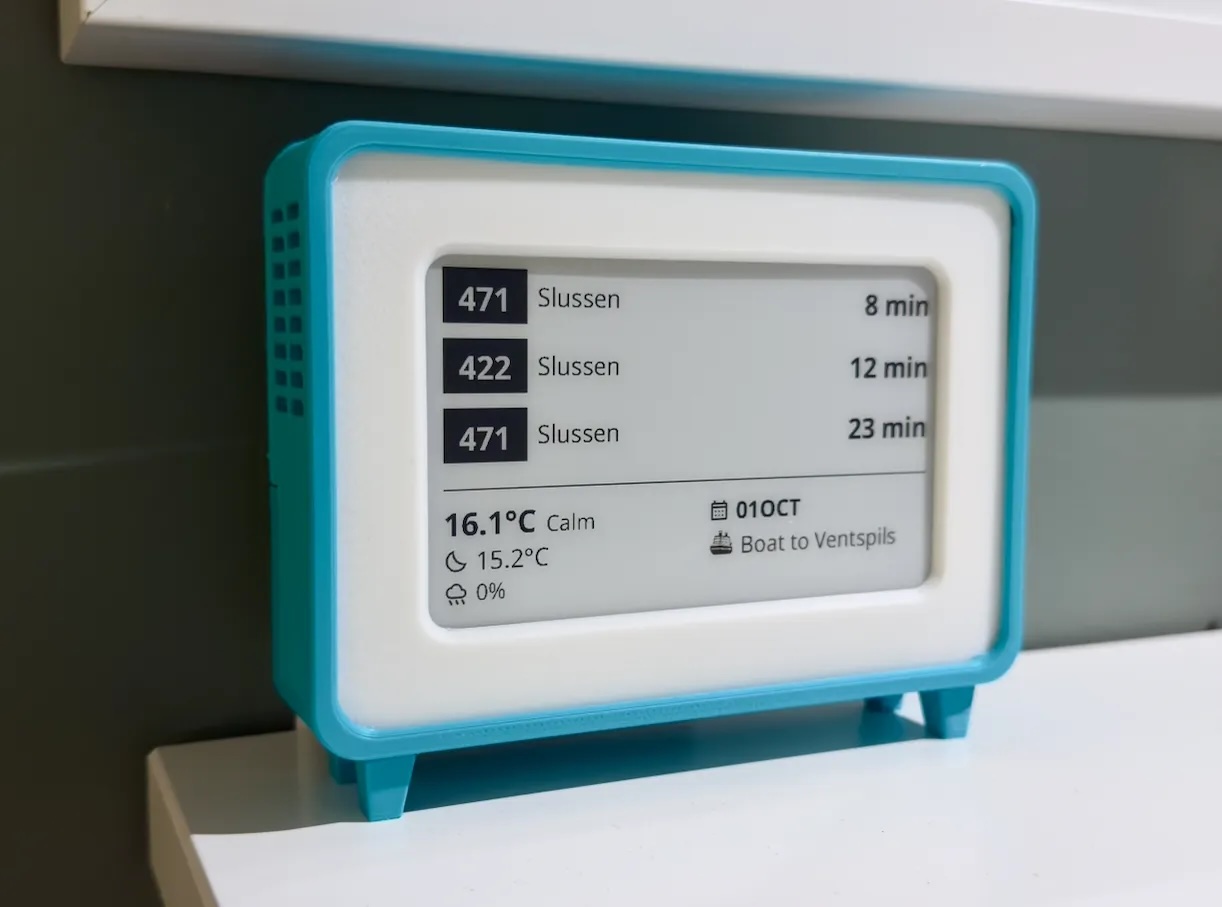
When I moved to Sweden, I fell in love with those e-paper displays at bus stops. Fast forward to summer of 2025, and I remembered I had a Pi Zero W collecting dust.
So first step, was figuring out how these displays work. I ended up ordering the e-Paper hat screen which can be easily attached to a raspberry pi. You will save a lot of time with these screens from WaveShare since they have their libraries easily accesible.
The hardware
Attaching the display to the raspberry is very simple. The raspberry pi has a HAT interface. This is a series of inputs and outputs that allow you to attach and connect other hardware safely.
You will need either an external power supply or batteries with a booster/limiter to 5V.
The software
You can find in my GitHub the source code. It is a little bit messy since it has been a long time I've used Python and first time creating a bitmap with it.
main.py
In this file you will find what creates the bitmap. I'll explain part by part how it works so it is easy for you to experiment and update.
In the following snippet you will find the imports, we load, if it exists, the .env file with your own variables. And we set where we are temporarily saving the bitmap.
import sys
import os
import json
import requests

from dotenv import load_dotenv

load_dotenv()

libdir = os.path.join(os.path.dirname(os.path.realpath(__file__)), 'lib')
from PIL import Image, ImageDraw, ImageFont
from datetime import datetime
if os.path.exists(libdir):
    sys.path.append(libdir)

from waveshare_epd import epd4in26

API_URL = os.getenv("API_URL", "http://localhost:3000/display")
API_KEY = os.getenv("API_KEY", "your_auth_key_here")

DUMP_BMP_PATH = "/tmp/dump.bmp"
The API_URL is from where we are retrieving the payload to render the bitmap. That API runs in another file that I'll explain after.
def fetch_api_response():
    headers = {"Authorization": f"Bearer {API_KEY}"}
    try:
        response = requests.get(API_URL, headers=headers, timeout=20)
        response.raise_for_status()
        return response.json()
    except Exception as e:
        print(f"API fetch error: {e}")
        return None

def get_buses(api_response):
    return api_response.get("buses", []) if api_response else []

def get_weather(api_response):
    return api_response.get("weather", {}) if api_response else {}

def get_calendar(api_response):
    return api_response.get("calendar", {}) if api_response else {}
The function fetch_api_repsonses() fetches from the API a single JSON and then selects the different keys with the information we will display.
After this we define the size of our bitmap, where we are positioning different elements and also you will find some mappings of unicode emoji's.
WIDTH, HEIGHT = 800, 480
LEFT_MARGIN = 20
// ...
ICON_TWILIGHT = "\uE1C6"
ICON_SUN = "\uE81A"
One very good advantage of doing a bitmap instead of just sending text to the screen is the fact that we can use whatever font we want. This is not possible when using the screen directly because it just has some basic fonts loaded.
try:
    FONT_LARGE = ImageFont.truetype(os.path.join(libdir, "fonts/NotoSans-Regular.ttf"), 42)
    FONT_MEDIUM = ImageFont.truetype(os.path.join(libdir, "fonts/NotoSans-Regular.ttf"), 34)
// ...
    FONT_EMOJI_SMALL = ImageFont.truetype(os.path.join(libdir, "fonts/NotoEmoji-VariableFont_wght.ttf"), 30)
except:
    FONT_LARGE = FONT_MEDIUM = FONT_SMALL = FONT_BOLD_LARGE = FONT_BOLD_MEDIUM = FONT_BOLD_SMALL = ICON_LARGE = ICON_MEDIUM = ICON_SMALL = ImageFont.load_default()
Now time for the different sections / contents of the screen:
def draw_buses(draw, buses):
    y = TOP_MARGIN
    for bus in buses[:3]:
        row_left = LEFT_MARGIN
// ...

def draw_separator(draw):
    line_y = Y_OFFSET_BOTTOM_CONTENT-20
    draw.line([(LEFT_MARGIN, line_y), (WIDTH - RIGHT_MARGIN, line_y)], fill="black", width=2)

def draw_weather(draw, weather):
    temp_text = f"{weather['current_temp']}"
    wind_text = f"{weather.get('wind_condition', '')}"
// ...

def draw_calendar(draw, calendar):
    right_x = WIDTH // 2 + 10
    event_title = calendar.get('event_date', '')
// ...
If you want to modify how any of the sections look or the data looks you shoud look into those functions.
The other functions are helpers for identifying emojis and replacing unicode
def is_emoji(char):
    codepoint = ord(char)
    return (
        0x1F600 <= codepoint <= 0x1F64F or  # emoticons
//...

def draw_mixed_text(draw, pos, text, font, emoji_font, fill="black"):
    x, y = pos
// ...
And then the execution of everything, drawing, and uploading to the screen.
The epd is the main controller library of your screen, after updating it, you send a sleep() command that closes the GPIO, this way you avoid wasting energy keeping the channel open.
def main():
    api_response = fetch_api_response()
    buses = get_buses(api_response)
// ...

if __name__ == "__main__":
    main()
    epd = epd4in26.EPD()
// ...
api-server.py
This is a simple http server that returns your sources already formatted. My recommendation is that unless you want to display different type of information, you keep the same payload. This way you don't have to update the previous file as well.
The weather API is free (rate limited) from open-meteo.
Since I live in Sweden, I use the public transport API provided by Trafiklab, kudos to these people, the API is amazing.
For calendar events I use iCloud, I have a shared calendar with my girlfriend for our common events and is very easy to consume it. I'm guessing it would be the same with Google or any other calendar that supports WebDAV.
You can run the server in the same RPI or somewhere else.
The case
You can find the STL files in my printables profile. If you want a variation and don't know how to do it, let me know maybe I can help you.
It is very simple to assemble it, to accomodate where the PI seats you can just use the screws from the HAT. And to close it you will need a couple of M3 screws.
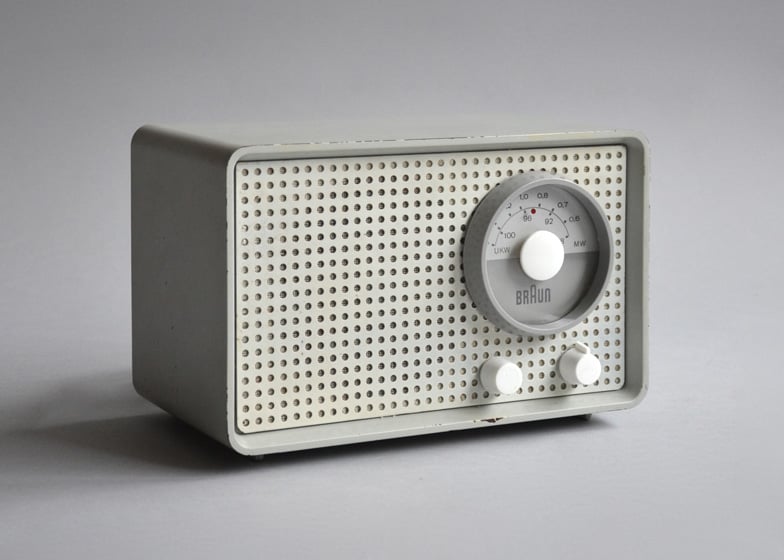
The design is based on the marvelous old Braun designs.
What is next
I want to add a C written script that maybe does everything. If I had to do it again I would instead use a ESP32. I would not buy a RPI for this, but this PI is so unstable that it didn't serve the purpose I originally bought it for.